























Update article
For Advanced Users - Exporting, Importing, and Duplicating Building Blocks and Menu Items
Power users who want to reuse content in the app in the form of modules and menu items, or who simply want to transfer content to other apps, now have a solution.
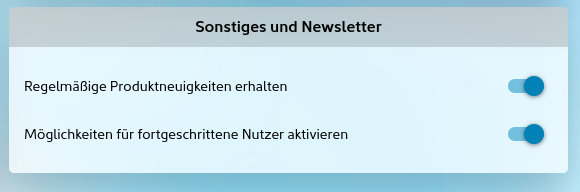
Once the toggle for advanced users has been activated under "Miscellaneous and Newsletter" in the contact details, additional features become available in the settings. Please note: A higher-tier app package may be required for this.
From there, the relevant functions can be accessed in the menu item overview as well as in the settings areas of the modules:
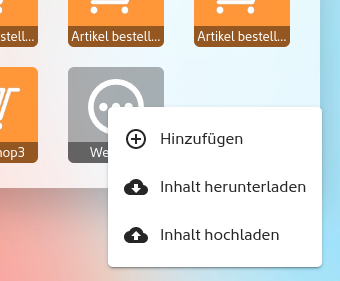 | 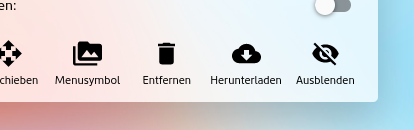 |
The content of modules and menu items can now be easily downloaded to your local PC, Mac, or tablet and uploaded or imported elsewhere in the same app or even in other apps. This makes duplicating content a simple step.
What is transferred or read out during this process?
Typically, the entire content of the modules/menu items is read and downloaded. This also includes linked images from the media library. When the module is uploaded, the images are properly transferred to the new media library in another app.
What data is not downloaded?
Modules also contain, for example, so-called transaction data, such as confirmed appointments in the appointment module, loyalty points awarded on loyalty cards, or individual data records in the digital data processing module. Additionally, there may be optionally linked "Likes" and user comments. This type of data is intentionally not included in the export.
This function is therefore not suitable for simply copying, storing, and later importing the menu items!
Are submenus and the modules beneath them also downloaded?
Yes, for submenus, all modules stored within them are also downloaded, including all associated images from the media library. For a mobile shop, for example, the entire catalog—including product descriptions, product images, and linked images—is exported.
Why are some of the downloaded files so large?
Depending on the size of the modules, including images and other sub-sections, larger data volumes may result. However, the file is compressed before downloading, reducing its overall size.
Can I further edit the downloaded modules locally?
Currently, the exported files are highly encrypted for data protection reasons. This ensures smooth operation and protects against tampering with the stored data after it has been exported and before it is imported again. This may change in the future.