























Update Artikel
Login in der App - Weg frei für mehr Personalisierung und noch viel mehr.
Ihre App hat aus der Sicht von außen bislang nur anonyme Nutzer gesehen. Vollkommen ohne Gesicht und Stimme.
Inzwischen geht es anders! Neue und alte regelmäßige Nutzer Ihres mobilen Angebotes können nun sich mit Hilfe eines vereinfachten Verfahrens in der App anmelden und diese somit Personalisieren.
Dazu genügt ein Fingertipp auf das obige rechte Menü und dem Punkt "Anmelden".
Greifen wir uns dazu die "Willich erleben App" - das Magazin für die gesamte Stadt Willich als passenden Beispiel:
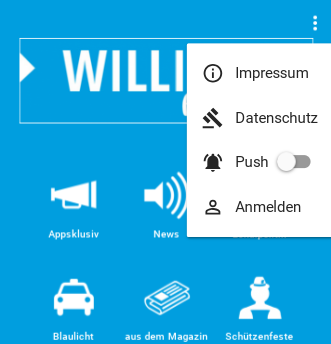
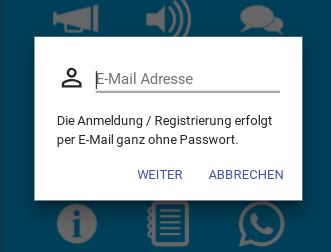
Nach dem Klick wird lediglich die E-Mail-Adresse erfragt. Die im nächsten und letzten Schritt noch bestätigt werden muss.
Nach der Bestätigung und der Rückkehr zur App ist man als Nutzer schon angemeldet.
Damit öffnet sich neue Wege für künftige neue Möglichkeiten. Ihre Nutzer können und sollen künftig mehr mit Ihrer App interagieren können. Auch werden die persönlichen Einstellungen nun gespeichert und so sicher aufbewahrt.
Wie viele Nutzer sich bereits angemeldet haben, wenn Sie diese Funktion aus welchen Grund auch immer deaktivieren möchten, erfahren Sie im Verwaltungsbereich unter den allgemeinen Einstellungen:

Kleiner Tipp: mithilfe des Untermenüs können Sie jetzt Bereiche in Ihrer App schaffen, die nur berechtigten Personen vorbehalten ist. Auch hier lässt sich einfach die E-Mail-Adresse als Zutritt der Person hinterlegen. Mehr Information gibt es in unserem Hilfeartikel.