























Blog Article
Content Editing 2.0 – Plain content is a thing of the past. 📒✏️
As part of our ongoing efforts to improve our product, we have spent a long time searching for the perfect successor to our content editor. Until now, our content editing capabilities were already on par with those of other products. Nevertheless, through our own use of the editor and valuable customer feedback, we identified a few shortcomings in our daily work with it.
This led us to make initial changes to the existing editor and, in the long term, to look for a truly scalable alternative that would eliminate all the bugs and unnecessary limitations without affecting the millions of pieces of content already stored.
Following a corresponding testing and transition phase with a small group of users, the new editor is now being rolled out to all users.
The new editor matches the previous version in terms of ease of use and the layout of the button commands. This enables a quick transition in workflow.
All existing functions have been carried over exactly as they were and improved in terms of usability. From now on, it is much easier to embed videos from YouTube and Vimeo, for example, or to perform manual edits directly in the HTML section to meet professional standards. The editor is also available on smartphones, allowing you to publish content from your mobile device.
Below you will find a brief overview of the new and updated features.
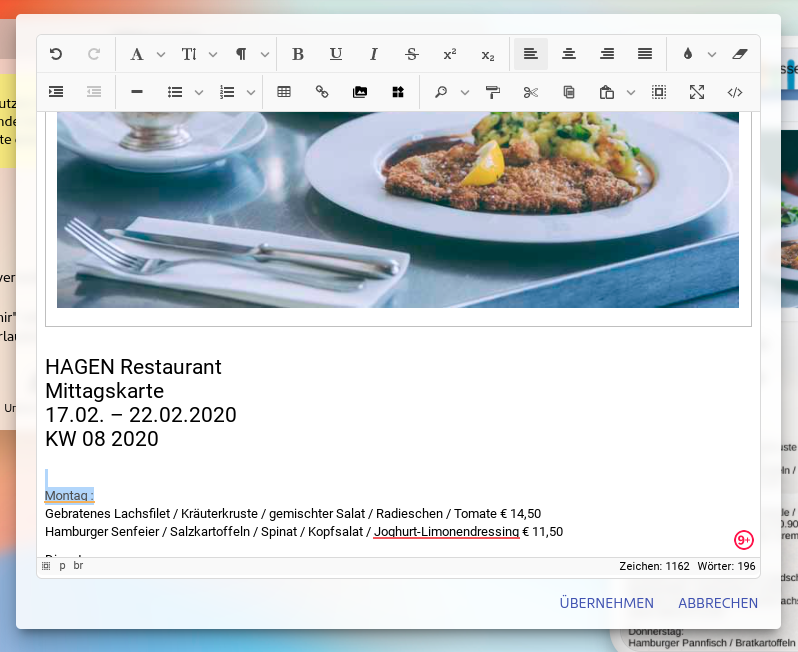
The following additions and changes are now available in your content editing with the new editor:
- Easy insertion of YouTube and Vimeo videos via link.
- Links that are inserted are now implemented directly as such.
- When inserting formatted content, a prompt will now appear asking whether the content should be inserted with formatting or as plain text.
- Images, videos, and buttons/links can be moved within the editor using drag-and-drop. This also applies to table cells.
- Inserted images can be replaced with another image at any time.
- Inserted images can now easily be made clickable.
- Images copied from other pages are now integrated as images immediately upon pasting.
- Integrated search and replace function.
- (For HTML experts) iFrames are automatically enabled in the new editor. No further confirmation is required.
- The editor window now adapts much more intelligently to the screen's aspect ratio.
- (Note!) The editor is now finally accessible on small screens as well.
- The generated HTML code now uses only images and no unnecessary helper elements. This results in clean code and improves quality.
- When I select something and switch to the source code view, the location of the relevant HTML element is immediately visible there.
- (For HTML experts) The underlying structure of the source code view now uses a different technology. This means you can also show and hide sections there. Auto-complete for input is also already included.
- And much more....
We wish you every success with the new workflow.