Logging in to the app – paving the way for more personalisation and much more
Until now, your app has only seen anonymous users from the outside. Completely without a face or a voice.
That has changed! New and regular users of your mobile offer can now log in to the app with a simplified process and so personalise it.
All it takes is a tap on the menu at the top right and then on “Log in”.
Let’s take the “Willich erleben” app – the magazine for the whole town of Willich as an example:
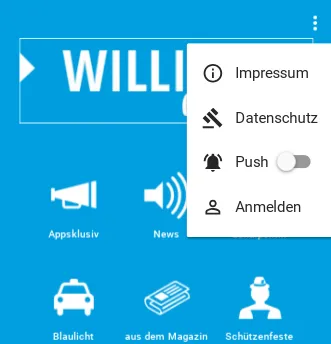
After the tap, the app only asks for the email address, which then has to be confirmed in the next and last step.
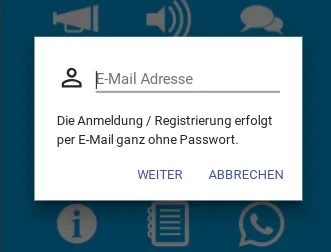
Once users have confirmed it and returned to the app, they are logged in.
This opens up new ways for new possibilities in the future. Your users can and should be able to do more with your app from now on. Personal settings are now saved, too, and so kept safe.
You can see how many users have already logged in, and switch the feature off if, for whatever reason, you want to, in the management area under the general settings:

A little tip: with the submenu you can now create areas in your app that are reserved for authorised people only. Here, too, you simply store a person’s email address as their key. You’ll find more information in our help article.
Your app in minutes. Give it a try.
20 days free, no credit card.