Content editing 2.0 – plain content is a thing of the past. 📒✏️
As part of continually improving our product, we spent a long time looking for the perfect successor to our content editor. Until now, editing content already compared well with other products. Even so, working with it ourselves and valuable feedback from customers showed us one or two shortcomings in everyday work with the editor.
So besides making first changes to the existing editor, we set out to find a truly expandable long-term alternative that removes all the bugs and unnecessary limitations without affecting the many millions of pieces of content already stored.
After a test and transition phase with a small group of users, it is now being released to everyone.
The new editor follows the previous one in ease of use and in the arrangement of its toolbar buttons. That makes it quick to get used to.
All existing features have been carried over one to one, and each of them is now easier to handle. From now on you can, among other things, embed videos from YouTube and Vimeo much more easily, or work directly in the HTML without a hitch to meet professional needs as well. The editor also works on a smartphone, so you can, for example, publish content from your phone.
Below you will find a short overview of the new and changed options.
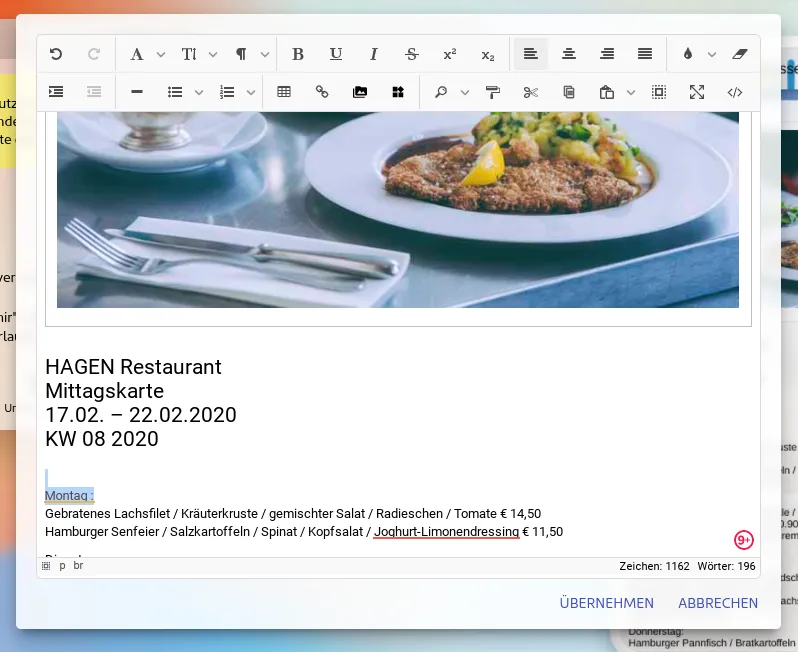
With the new editor, the following additions and changes come to the way you edit content:
- Easily insert YouTube and Vimeo videos by link.
- Links you paste now become links straight away.
- When you paste formatted content, you are now asked whether to paste it formatted or as plain text.
- Images, videos and buttons / links can be moved around in the editor by drag & drop. In table cells too.
- An inserted image can be replaced with another one at any time.
- Inserted images can now easily be turned into links as well.
- Images copied from other pages now arrive as images as soon as you paste them.
- Built-in search and replace.
- (For HTML experts) With the new editor, iFrames are activated automatically. No more confirmation needed.
- The editor window now adapts much more intelligently to the size of the screen.
- (Heads up!) The editor is finally usable on small screens too.
- The generated HTML code no longer needs unnecessary helper elements around images. That means clean code and better quality.
- If you select something and switch to the source code view, you see the position of the HTML element in question right there.
- (For HTML experts) The source code view now runs on a different technology underneath. This means you can collapse and expand sections there too. And autocomplete for your input is already included.
- And much more…
We wish you every success with the new way of working.
Your app in minutes. Give it a try.
20 days free, no credit card.